| Auto Manual Voucher Numbering | |
| This TDL is intended to assist users with auto generated voucher numbers though Voucher Type is configured for Manual Voucher Numbering Mode. | |
 User Manual User Manual | |
 Auto Manual Voucher Numbering Auto Manual Voucher Numbering  | |
| Developer Manual | |

Auto Manual Voucher Numbering
Cost Centre Wise Columnar Profit & Loss and Balance Sheet
| Cost Centre Wise Columnar Profit & Loss and Balance Sheet | |
| This TDL is used to study the organizational Profitability and Net worth across each cost/profit centres. The user is able to see the balance sheet and Profit and Loss account cost centre wise as well. | |
| User Manual | |
| CC wise Columnar PL and BS | |
| Developer Manual | |
Auto Bank Reconciliation
| Auto Bank Reconciliation | |
| This TDL is used to enable the Automatic Bank Reconciliation in Tally.ERP 9. The Bank Statement received from Bank in Excel Format needs to be validated with Bank Books as per company records entered in Tally. The validation needs to be done for different conditions. The default Bank Reconciliation Report in Tally displays a list of unreconciled vouchers and allows the user to input a field Bank Date on which the corresponding entry has been effected by the Bank. | |
| User Manual | |
| Auto Bank Reconciliation | |
| Supporting Files | |
| Developer Manual | |
Auto Cheque No. Generation and Tracking
| Auto Cheque No. Generation and Tracking | |
| This TDL is used for generating the Cheque numbers automatically when the payment voucher is passed. This automated cheque number is generated as per the user specified cheque number range in the Bank Ledger Master. Also this program will help us to track the Cheque Number from the List of Vouchers of the user specified Bank Ledger. | |
| User Manual | |
| Auto Cheque Number Generation and Tracking | |
| Developer Manual | |
User Configured Backup
| User Configured Backup | |
| This code is intended to help minimize data loss by taking routine Backups automatically. | |
| User Manual | 416 KB |
| User Configured Backup | 3.12 KB |
| Developer Manual | 198 KB |
Free Feature Extensions
Free Feature Extensions
The Free Feature Extensions have been developed and tested as per TDL enhancements available from Release 1.8 onwards. Some of these may not work with earlier Releases.
Steps to Enable TDLs
Steps to Enable TDLs TSPL FFE Common Library | |
| This TDL includes commonly used functions and system formulae which are collated together under Common Library. This TDL has to be included with all the TDLs which you require to use. | |
| TSPL FFE Common Library | 2.39 KB |
| We have categorized the TDLs mainly into two parts. The TDLs marked as reference may NOT serve the customer requirements directly and will require changes in some form or the other to meet specific needs. Please contact us for further customizations on the same. | |
What's New
What's New
Tally.Developer 9 Release 2.0 Available Now
The powerful Remote Edit feature available in the latest version of Tally.ERP 9 Release 2.0 called for complementing changes in the Default Code in order to facilitate this capability. Now, you get the source code of Tally.ERP 9 Release 2.0 in the current version of the product! In addition, the changes at the feature and functionality level are done keeping in mind the documentation and help requirements of the TDL developer community.
The interesting highlight of this Release is the introduction of Dictionary Manager Tool. This will revolutionize the usage of Tally.ERP 9 across the world in any preferred language used for official purposes.
TDL Enhancements in Tally.ERP 9 Release 2.0
1. TDL Procedural Enhancements
With every Release the TDL Procedural Capabilities are getting strengthened at a commendable pace. The latest along this path is the File Input Output Capability.
Procedural File Input/Output Capability
This capability introduced in TDL now will pave the way for supporting import/export operations from the Tally DataBase in the most amazing way. It will now be possible to export almost every piece of information in any Data Format which we can think of. We support Text and Excel Format which allow data storage in SDF-Fixed Width ,CSV-comma separated etc sufficing the generic data analysis requirements of any business.
The Read/Write exchange is supported across the various protocols like ftp and http as well. Inside a function the file contexts available are Source File and Target File. The data can be read from one file and can be written to another file simultaneously.
It is now possible to perform Read/Write on a Text and Excel File without the dependency on any of the definitions. This gives complete control in the hands of the programmer to perform these operations. We have provided a comprehensive set of Actions and Functions to perform the various file operations.
For a text file
• Read Operation : Various functions for this support reading a specified no of characters,
reading a line and moving the file pointer to a specific location
• Write Operation : Various Actions for this support writing a specified no of characters, writing
a line and moving the file pointer to a specific location.
For a Excel File
• Read Operation : Various functions for this support locating the Active Sheet, finding the
sheet name from index and vice versa and reading data from a specified cell.
• Write Operation : Various Actions for this support Adding a new sheet, making a sheet Active,
Writing to a cell, writing an entire row or an entire column.
Function Parameter Changes
The various changes at this level allow the user to pass optional no of parameters to a function for eg: If a function takes three parameters, it is now possible to pass only one or two parameters while calling the functions as it is possible to specify default values for those parameters inside the function declaration itself.
2. Variable Framework Enhancements
In the prior releases we have experienced major changes to the Variable Framework in form of introduction to Compound Variables and List Variables. We are continuously enhancing and making changes to ensure consistency and uniformity across the TDL framework. The following enhancements have taken place in variable framework recently.
Persistence at Report Scope
Earlier we supported persistence of the variable at System scope Only . This has been extended for Report Scope Variables as well. The actions supported for this allow saving of a list of variables to a specific file and then retrieving from the file across Tally sessions. The file format supported for this is a ".pvf"( Portable Variable Format) file.
Multiple Instances & Replicating Variables
Till date it was not possible to declare two variables of same type. For eg : If we had a Compound Variable by the name Employee, we could declare a variable by the name Employee at various scopes ie at System/Report/Function. The only way to declare multiple variables of type Employee was to create a List Variable. In cases where we need to refer to more than one variable of type Employee by different names, the need to have multiple instances becomes mandatory. With the current enhancement it is now possible to declare, refer and operate on two or more variables Emp A and Emp B of same type Employee.
Actions to copy the data from one variable to another is also supported.
Absolute Specification in Dotted Syntax
The dotted syntax support for variables was limited to Relative specification ie it was possible to access the value of a variable starting from at the current scope only. This dotted syntax for variables has been enhanced to support absolute specification ie it is now possible to access variable values from parent scope as well. For eg : If we are at function B which is called from Report A, we can access a variable abc available at Report A using absolute specification.
3. Event Framework Enhancements
Timer Event Support
This is a path breaking enhancement in Tally which will enable scheduled execution of any Action. This has been supported with the introduction of a System Event called Timer. We can have a set of timer events of specified durations and trigger an Action on the same. For eg: if we require Synchronization to be triggered every one hour we can define a Timer event which triggers the action Sync. Actions for Starting and Stopping the timer have been provided.
4. Enhancements for Remote Edit
There have been various enhancements at the TDL level to enable Remote Edit Capability in the product. The enhancements are listed as below
Fetch Object Attribute Changes
The attribute Fetch Object is supported at Report, Form, Field and Function level as well. The Object Name specification in the syntax allows expressions now. It is also possible to specify multiple Object Names separated by the Fetch Separator Character. A new function $$FetchSeperator is introduced to return this character.
Fetch Values Atribute Introduced
The evaluation of External Methods of an Object requires Object Context to be available at the Client End. A new Attribute Fetch Values is provided at the Report level to specify the list of External Methods.
Multi Objects Attribute Introduced
Whenever multiple Objects of the same collection is getting modified at the Client End, a new attribute called MultiObjects is introduced at the Report Level to enable the same.
Modifies Attribute Changes
The Modifies attribute of the field is changed to accept a third parameter(optional) which is an expression. This allows the variable to be modified with the value of the expression rather than the field value.
Collection Attribute-Parm Var
As we already know the Collection Artifact evaluates the various attributes either during initialization or at the time of gathering the collection. It may require various inputs from the Requestor context for the same.
The direct reference of values/expressions from the report elements and objects in the collection at various points creates various issues like code complexity, performance lapses and non availability of these values on Server in Remote Environment.
In order to overcome the above we have introduced a new Collection attribute Parm Var.
Parm Var in collection is a context free structure available within the collection. The requestors Object context is available for the evaluation of its value. This is evaluated only once in the context of the caller/requestor. This happens at collection initialization and the expression provided to it is evaluated and stored as a variable which can be referred within any of the attributes of the collection at anytime and is made available at the Server end as well.
5. Generic Capabilities
Copy File
A new Action Copy File has been introduced. This allows Copy of a file across folders, upload and download to a ftp path.
Refresh Data
In a multiuser environment, the data is being manipulated by multiple users at the same time. The changes in data will affect the data displayed in various Reports. A report which is opened on a system may not display the correct information since it is not continuously Refreshed. In order to achieve the same a new Report Specific Action Refresh Data has been introduced. This Action coupled with its usage along with timer event can be used to refresh a Report at periodic intervals
Sleep
Action SLEEP is introduced to specify time delays during execution of the code. For few seconds, the system will be dormant or in suspended mode.
Some Examples
Some Examples
Basic Customisations
• In Item Master, Description has to be entered more than once.
• In Configuration Screen, an option must be added "Require Multiple Lines
for Description" & based on the value set, behavior must change.
• Alter the Description and activate/deactivate Batches Info for all Items falling
under a particular Stock Group.
• Default allows Stock Group wise price List Updation. To enable Updation of the
same Stock Item Wise.
• Exporting a report in the required XML Format
• Barcode printing in Tally
Voucher/Invoice Customisation & Reports
• While entering Sales Voucher, all the Description set in the Item Master should be
set in the User Description Field on selecting the Item.
• Altering Payment/Receipt/Contra Vouchers to have additional UDFs for Bank Name,
Cheque No. and Date if the Bank Ledger is transacted with.
• Providing Amount wise discount column in Pricelist as well as Sales Invoice
• Alter the concerned Voucher Printing Formats to print the above details
• Preprinted Invoice Format
• Convert the above Format to Plain Invoice Format
• Convert the above Format to both preprinted as well as plain format based on
user choice
• Tracking the Voucher right from creation to details of last alteration like User Name,
Reason for Altering, altered date, etc
• Number of Times PO is Altered and Reason for the same to be recorded
• Printing Sales Invoice (above format) and Packing List i.e., Multiple Forms
• Purchase Order Print Format similar to the above Sales format.
• Alteration of Default Sales Invoice Format to include Stock Groups and grouping the
relevant Stock Items under them.
• Cash Receipt and Payment report
• Label Printing
• Item Wise Party Wise Sales
• Cost Centrewise (Salesman) Bills Outstanding Report
Work Flow Customisation
• Create Provisional Entries (Post Dated) like Rent for the next 12 months.
• From a Purchase Entry, alter the Purchase Orders Quantity
• Add a Logical UDF next to PO No accepting input to Close PO
• All the POs against which YES is mentioned should be altered to the Qty received till date
so that the PO will be knocked off from the Pending list for the respective Items.
• Convert Multiple Delivery Notes (of a Party) to single Sales Invoice automatically
(based on user selection in report displaying list of delivery notes pending)
• A subset of Material Requirement Planning (Based on Sales Order entered and BOM)
• Control bills of a customer based on overdue period
• Automatic Bank Reconciliation from external sources
• Also to accept the location of files from the user
• From the above path, Bank Dates need to be automatically updated
Sync Customisation & Security Control
• Voucher Type wise Sync Filter
• One Way Sync
• Masters Only Sync
• Vouchers Only Sync
• Applying Transformations during Sync using XSLT ( PO to SO etc)
• Security Control for Master wise security
• Voucher Type wise Security Control
• Providing additional security control over default security control. For e.g., Disabling
of creation/alteration/deletion privilege though the user has got admin rights
• In Item Master, Description has to be entered more than once.
• In Configuration Screen, an option must be added "Require Multiple Lines
for Description" & based on the value set, behavior must change.
• Alter the Description and activate/deactivate Batches Info for all Items falling
under a particular Stock Group.
• Default allows Stock Group wise price List Updation. To enable Updation of the
same Stock Item Wise.
• Exporting a report in the required XML Format
• Barcode printing in Tally
Voucher/Invoice Customisation & Reports
• While entering Sales Voucher, all the Description set in the Item Master should be
set in the User Description Field on selecting the Item.
• Altering Payment/Receipt/Contra Vouchers to have additional UDFs for Bank Name,
Cheque No. and Date if the Bank Ledger is transacted with.
• Providing Amount wise discount column in Pricelist as well as Sales Invoice
• Alter the concerned Voucher Printing Formats to print the above details
• Preprinted Invoice Format
• Convert the above Format to Plain Invoice Format
• Convert the above Format to both preprinted as well as plain format based on
user choice
• Tracking the Voucher right from creation to details of last alteration like User Name,
Reason for Altering, altered date, etc
• Number of Times PO is Altered and Reason for the same to be recorded
• Printing Sales Invoice (above format) and Packing List i.e., Multiple Forms
• Purchase Order Print Format similar to the above Sales format.
• Alteration of Default Sales Invoice Format to include Stock Groups and grouping the
relevant Stock Items under them.
• Cash Receipt and Payment report
• Label Printing
• Item Wise Party Wise Sales
• Cost Centrewise (Salesman) Bills Outstanding Report
Work Flow Customisation
• Create Provisional Entries (Post Dated) like Rent for the next 12 months.
• From a Purchase Entry, alter the Purchase Orders Quantity
• Add a Logical UDF next to PO No accepting input to Close PO
• All the POs against which YES is mentioned should be altered to the Qty received till date
so that the PO will be knocked off from the Pending list for the respective Items.
• Convert Multiple Delivery Notes (of a Party) to single Sales Invoice automatically
(based on user selection in report displaying list of delivery notes pending)
• A subset of Material Requirement Planning (Based on Sales Order entered and BOM)
• Control bills of a customer based on overdue period
• Automatic Bank Reconciliation from external sources
• Also to accept the location of files from the user
• From the above path, Bank Dates need to be automatically updated
Sync Customisation & Security Control
• Voucher Type wise Sync Filter
• One Way Sync
• Masters Only Sync
• Vouchers Only Sync
• Applying Transformations during Sync using XSLT ( PO to SO etc)
• Security Control for Master wise security
• Voucher Type wise Security Control
• Providing additional security control over default security control. For e.g., Disabling
of creation/alteration/deletion privilege though the user has got admin rights
Integration Capabilities
Integration Capabilities
Tally.ERP 9 has been developed keeping in mind that some users will require features and capabilities that are not delivered out of the box. This calls for the ability to reach out to other software applications.
The many strengths of Tally.ERP 9 also make it an ideal product for integration with other products - which calls for the ability to provide the necessary APIs for read and write.
Tally.ERP 9 as a complete business solution provides different ways to integrate data. The various API’s available in Tally are
• XML
• ODBC
• DLL
These allows seamless integration between application/database in two modes
Online Mode
• Tally to Tally using Synchronisation
• Tally to External Application and vice versa using the Interfaces Available
• Tally to Web Service using HTTP Interface
Offline Mode
• Tally to External Applications using Export
• Data from External Application in XML using Import
The various terminologies stated above are described as below
Synchronisation
Tally.ERP 9 to Tally.ERP 9 integration is done through synchronisation. All the branches can periodically synchronise their data with the head office. Data Synchronisation refers to a process where data is replicated between two or more locations. It enables the branch offices to send data to the head office and vice versa, over a network with a dynamic IP address or static IP address. Data Synchronisation flows both ways, i.e., data flows from the Client to the Server and vice-versa.
Import
If the masters and transactions is available in Tally.ERP 9 compatibly XML format, they can be directly imported in Tally.ERP 9.
Export
Tally.ERP 9 allows the export of reports in four standard formats, viz. ASCII (Comma Delimited), Excel, HTML, and XML.
Tally API's
Tally.ERP 9 communicates with External Application using these interfaces:
• XML Interface(Get/Post)
Using this interface Tally.ERP 9 can behave as a Server handing XML Request from
external Applications. Tally as a Client can also send an XML Request to a Web Service
• ODBC Interface(Read Only)
External Applications can retrieve data from the Tally.ERP 9 database by making an
ODBC/SQL call. In the same way Tally.ERP 9 can retrieve data from External Data Source
using an ODBC/SQL call.
• DLL
The DLLs developed using other application can be used to perform operations that are
not available in the product. These external DLLs can be called from Tally.ERP 9 using the
TDL language.
With these capabilities you get to use Tally.ERP 9 as a single window application across all software products in your enterprise.
Tally.ERP 9 - Integration Capabilities
3rd Party Application Integration with Tally.ERP 9
Demo Samples
Supporting Files
The many strengths of Tally.ERP 9 also make it an ideal product for integration with other products - which calls for the ability to provide the necessary APIs for read and write.
Tally.ERP 9 as a complete business solution provides different ways to integrate data. The various API’s available in Tally are
• XML
• ODBC
• DLL
These allows seamless integration between application/database in two modes
Online Mode
• Tally to Tally using Synchronisation
• Tally to External Application and vice versa using the Interfaces Available
• Tally to Web Service using HTTP Interface
Offline Mode
• Tally to External Applications using Export
• Data from External Application in XML using Import
The various terminologies stated above are described as below
Synchronisation
Tally.ERP 9 to Tally.ERP 9 integration is done through synchronisation. All the branches can periodically synchronise their data with the head office. Data Synchronisation refers to a process where data is replicated between two or more locations. It enables the branch offices to send data to the head office and vice versa, over a network with a dynamic IP address or static IP address. Data Synchronisation flows both ways, i.e., data flows from the Client to the Server and vice-versa.
Import
If the masters and transactions is available in Tally.ERP 9 compatibly XML format, they can be directly imported in Tally.ERP 9.
Export
Tally.ERP 9 allows the export of reports in four standard formats, viz. ASCII (Comma Delimited), Excel, HTML, and XML.
Tally API's
Tally.ERP 9 communicates with External Application using these interfaces:
• XML Interface(Get/Post)
Using this interface Tally.ERP 9 can behave as a Server handing XML Request from
external Applications. Tally as a Client can also send an XML Request to a Web Service
• ODBC Interface(Read Only)
External Applications can retrieve data from the Tally.ERP 9 database by making an
ODBC/SQL call. In the same way Tally.ERP 9 can retrieve data from External Data Source
using an ODBC/SQL call.
• DLL
The DLLs developed using other application can be used to perform operations that are
not available in the product. These external DLLs can be called from Tally.ERP 9 using the
TDL language.
With these capabilities you get to use Tally.ERP 9 as a single window application across all software products in your enterprise.
Tally.ERP 9 - Integration Capabilities 3rd Party Application Integration with Tally.ERP 9 Demo Samples Supporting FilesTally Technology
Tally Technology
Under the hood of the deceptively simple user experience of Tally.ERP 9 lies over 20 years of deep technology muscle. This section gets into this aspect in full detail.
Geared towards the more technical audience, our development partners, Independent Software Vendors, business 'component' builders and in-house IT shops at customer locations, the information here will also enable you to appreciate potential technical business opportunities with Tally.ERP 9.
Tally.ERP 9 is, foremost, a platform first. Tally.ERP 9, as a user sees it, is a product developed on the platform. The entire functional richness and user experience that you see has been built on this platform.
This unique architecture (an overview is here) delivers unprecedented capabilities required for any enterprise engagement:
• Extendability & Customisability
• Interface-ability & Integrate-ability
• Supportability
• Deploy-ability & Manageability
• People Availability
• Ecosystem Support
• 3rd Party Add-on's
Access to this platform is via our own Domain Specific Language - Tally Definition Language (an overview is here), the complete TDL source code for Tally.ERP 9 product, a development platform (Tally.Developer 9), complete documentation, training programs and a dedicatedsupport helpdesk.
Geared towards the more technical audience, our development partners, Independent Software Vendors, business 'component' builders and in-house IT shops at customer locations, the information here will also enable you to appreciate potential technical business opportunities with Tally.ERP 9.
Tally.ERP 9 is, foremost, a platform first. Tally.ERP 9, as a user sees it, is a product developed on the platform. The entire functional richness and user experience that you see has been built on this platform.
This unique architecture (an overview is here) delivers unprecedented capabilities required for any enterprise engagement:
• Extendability & Customisability
• Interface-ability & Integrate-ability
• Supportability
• Deploy-ability & Manageability
• People Availability
• Ecosystem Support
• 3rd Party Add-on's
Access to this platform is via our own Domain Specific Language - Tally Definition Language (an overview is here), the complete TDL source code for Tally.ERP 9 product, a development platform (Tally.Developer 9), complete documentation, training programs and a dedicatedsupport helpdesk.
Architecture (Series A)
Architecture (Series A)
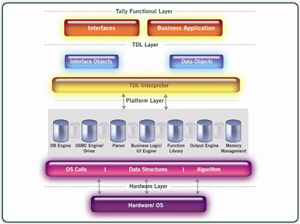
| The Tally.ERP 9 architecture can be conceptualized as being divided into three layers: • The Application /Tally.ERP 9 Layer • The TDL Language and Interpreter Layer • The Platform Layer /Engine | ||||
| ||||
| Tally Definition Language Tally Definition Language (TDL) provides capabilities for Rapid Development, Rendering, Data Management and Integration. This is the language used to deliver the capabilities that the platform provides - the entire user interface is built using TDL. TDL is an Action driven language based on definitions. It comprises of the User Interface and Info/Data objects. User Interface Objects mainly determine the behavior of the product in terms of user experience. Info/Data objects are mainly used for data persistence in the Tally Database. TDL Interpreter TDL works in an interpreted environment. An action performed by a user will trigger a particular segment of code to get executed. The interpreter examines each line and executes them. Platform Layer The capabilities which TDL offers are due to the capabilities provided by the platform layer. This is the lowermost layer which interacts with the OS and the file system. The various components of the platform layer are: • Database Engine • ODBC Engine/Driver • Parser • Business Logic • Function Library • User Interface and Output Engine • Memory Management All the retrieval and manipulation requests to the database by the application program are handled by the Database Engine. This is a true OODBMS. It is possible to store data as objects and retrieve data as objects. Stored as a block of data, this allows faster retrieval of data. Object Oriented Recursive Management System follows the concept of Flexi-Length Record, Flexi-Field, and Self-Indexed weighted file structure for an extremely compact and fast database. Fault tolerance is built in and along with transaction support (using roll forward capability), this provides an extremely robust system to withstand several system failures. The File System consists of Data files (Master, Transaction, Link Masters), Message Files (for transaction management) and State Files (for concurrency and exclusivity control). | ||||
Solutions with TDL
Solutions with TDL
The TDL language capabilities allow the TDL programmer to build complete solutions and deploy them with ease. Listed below are a few capabilities
• Rapid Report Design and development using various formats.
• Advanced Data Processing Capabilities using Collections.
• Complex Report generation using Tally Database.
• User defined additional storage fields within the Tally database.
• Customising Voucher Entry and printing in multiple formats
• Multiple Output Capability like email, print, display etc
• Modifying existing default Reports to incorporate/ alter required fields
• Modify the existing user entry screens as required
• Non-procedural language with procedural capability with User Defined Functions
• Remote Access Capability using Collections.
• Advanced Integration Capabilities of the Language
Using the capabilities listed above, we can achieve the following
• Invoice Printing, Payment Advice Printing, Voucher Printing, etc. in user desired
pre-preprinted or plain formats
• Various Columnar reports like Batch wise Item wise Reports, Item wise Party wise
Outward and Inward Movement Analysis
• Various security related controls like Voucher Type wise Entry Control, control the
table of selection based on users like Sales persons can view only Debtors Ledgers, etc.
• Customisation of Synchronization i.e., One way sync, Masters Only, Voucher Type wise
Sync between various branches and HO
• Creation of multiple Approval Levels
• Labels and Bar Code Printing
• Auto creation of Masters/ Transactions as required
And many more...
• Rapid Report Design and development using various formats.
• Advanced Data Processing Capabilities using Collections.
• Complex Report generation using Tally Database.
• User defined additional storage fields within the Tally database.
• Customising Voucher Entry and printing in multiple formats
• Multiple Output Capability like email, print, display etc
• Modifying existing default Reports to incorporate/ alter required fields
• Modify the existing user entry screens as required
• Non-procedural language with procedural capability with User Defined Functions
• Remote Access Capability using Collections.
• Advanced Integration Capabilities of the Language
Using the capabilities listed above, we can achieve the following
• Invoice Printing, Payment Advice Printing, Voucher Printing, etc. in user desired
pre-preprinted or plain formats
• Various Columnar reports like Batch wise Item wise Reports, Item wise Party wise
Outward and Inward Movement Analysis
• Various security related controls like Voucher Type wise Entry Control, control the
table of selection based on users like Sales persons can view only Debtors Ledgers, etc.
• Customisation of Synchronization i.e., One way sync, Masters Only, Voucher Type wise
Sync between various branches and HO
• Creation of multiple Approval Levels
• Labels and Bar Code Printing
• Auto creation of Masters/ Transactions as required
And many more...
The Development Platform
The Development Platform
Tally.Developer 9 is a comprehensive development environment designed specifically for the TDL (Tally Definition Language). TDL is the development language of Tally.ERP 9 and is used to build additional functionality into the product. TDL enables the programmers to develop and deploy solutions rapidly with ease.
Tally.Developer 9 makes your life as a programmers life easier as you are provided with powerful features like syntax highlighting, column selection and auto completion built into the development environment. Apart from this, the definition browser, schema browser and function browser are also available as a part of the product providing instant reference to the TDL programmer.
Tally.Developer 9 is an editor, search engine and an compiler as well. It also provides the tools to decompile a TCP, migrate an encrypted TDL file and Tally Connector to send XML request to Tally get the response in XML format.
The TDL code can be configured to run on one, more or all Tally serial number(s) while creating the TCP (Tally Complaint Product) file and also stamp the TCPs for a specific site. This enables you to control license usage and minimize revenue leakage.
Features of Tally.Developer 9:
• New Look and Feel
• Project Management
• Definition and Schema Browser
• Debugging and Diagnostics
• Auto Complete gives the list of attributes or the values of the attribute
• Enhanced search engine
• Tools to Decompile a TCP, Migrate an encrypted file and Tally connector
• Syntax checking and Highlighting
• Browser style Navigation
• In the editor collapse and expand option for definitions
• Enhanced Compiler
• Easy customer serial management
Getting started with Tally.Developer 9
Tally.Developer 9 Release Notes
Tally.Developer 9 makes your life as a programmers life easier as you are provided with powerful features like syntax highlighting, column selection and auto completion built into the development environment. Apart from this, the definition browser, schema browser and function browser are also available as a part of the product providing instant reference to the TDL programmer.
Tally.Developer 9 is an editor, search engine and an compiler as well. It also provides the tools to decompile a TCP, migrate an encrypted TDL file and Tally Connector to send XML request to Tally get the response in XML format.
The TDL code can be configured to run on one, more or all Tally serial number(s) while creating the TCP (Tally Complaint Product) file and also stamp the TCPs for a specific site. This enables you to control license usage and minimize revenue leakage.
Features of Tally.Developer 9:
• New Look and Feel
• Project Management
• Definition and Schema Browser
• Debugging and Diagnostics
• Auto Complete gives the list of attributes or the values of the attribute
• Enhanced search engine
• Tools to Decompile a TCP, Migrate an encrypted file and Tally connector
• Syntax checking and Highlighting
• Browser style Navigation
• In the editor collapse and expand option for definitions
• Enhanced Compiler
• Easy customer serial management
Getting started with Tally.Developer 9 Tally.Developer 9 Release Notes Tally Developer - The Development Platform of Tally.ERP 9
Tally Developer - The Development Platform of Tally.ERP 9
The language used to build Tally.ERP 9 is called TDL - Tally Definition Language, briefly touched upon in Internal Architecture & Design.
As a Tally Service Partner, a Tally Integrator, an internal IT 'shop' at a customer location or a free lancer developing extensions to Tally.ERP 9, we make available Tally.Developer 9, an Integrated Development Environment (IDE) along with the full TDL source code.
TDL has been designed to provide the following features:
Rapid Development
TDL is a language based on definitions. A definition language provides the users with 'Definitions' that can be used to specify the task to be performed. It is possible to reuse the existing definitions and deploy applications quickly. This is a language meant for rapid development. It is possible to develop complex reports within minutes. User can extend the default functionalities of the product by writing only a few lines of code.
Action Driven Language with Procedural Capabilities
TDL is an Action Driven language where the programmer can only control as to what happens when a particular event takes place. The action thus triggered can either be a platform defined action or an Action created by TDL programmer using User Defined Functions. The fundamental aspects of conditional evaluation and looping have been introduced into the language. The non-procedural elements are largely towards presentation layers and data gathering. The procedural elements can be used for flow control, computation and object data manipulation.
Multiple Output Capability
Using the same language it is possible to output to multiple output devices and formats .Whenever an output is generated this can be displayed on the screen, printed ,transferred to a file in particular format, mailed or transferred to a webpage using Http protocol.
Data Management Capability
Tally follows a hierarchical object oriented data structure. TDL provides the capability of creating and manipulating these objects with ease. Apart from the predefined objects user can also store and manipulate data as required by him.
Integration Capability
To meet the challenges of business environment it becomes absolutely mandatory to share information seamlessly across applications. Integration becomes a crucial factor in avoiding the duplication of data entry. The available Tally API’s ODBC, XML and DLL allow integration between
• Tally to Tally using Synchronisation
• Tally to External Application and vice versa using the Interfaces Available
• Tally to Web Service using HTTP Interface
• Tally to External Applications using Export
• Data from External Application in XML using Import
Getting Started With TDL
TDL Reference Manual
Samples - TDL
As a Tally Service Partner, a Tally Integrator, an internal IT 'shop' at a customer location or a free lancer developing extensions to Tally.ERP 9, we make available Tally.Developer 9, an Integrated Development Environment (IDE) along with the full TDL source code.
TDL has been designed to provide the following features:
Rapid Development
TDL is a language based on definitions. A definition language provides the users with 'Definitions' that can be used to specify the task to be performed. It is possible to reuse the existing definitions and deploy applications quickly. This is a language meant for rapid development. It is possible to develop complex reports within minutes. User can extend the default functionalities of the product by writing only a few lines of code.
Action Driven Language with Procedural Capabilities
TDL is an Action Driven language where the programmer can only control as to what happens when a particular event takes place. The action thus triggered can either be a platform defined action or an Action created by TDL programmer using User Defined Functions. The fundamental aspects of conditional evaluation and looping have been introduced into the language. The non-procedural elements are largely towards presentation layers and data gathering. The procedural elements can be used for flow control, computation and object data manipulation.
Multiple Output Capability
Using the same language it is possible to output to multiple output devices and formats .Whenever an output is generated this can be displayed on the screen, printed ,transferred to a file in particular format, mailed or transferred to a webpage using Http protocol.
Data Management Capability
Tally follows a hierarchical object oriented data structure. TDL provides the capability of creating and manipulating these objects with ease. Apart from the predefined objects user can also store and manipulate data as required by him.
Integration Capability
To meet the challenges of business environment it becomes absolutely mandatory to share information seamlessly across applications. Integration becomes a crucial factor in avoiding the duplication of data entry. The available Tally API’s ODBC, XML and DLL allow integration between
• Tally to Tally using Synchronisation
• Tally to External Application and vice versa using the Interfaces Available
• Tally to Web Service using HTTP Interface
• Tally to External Applications using Export
• Data from External Application in XML using Import
Getting Started With TDL TDL Reference Manual Samples - TDL
Subscribe to:
Posts (Atom)